The last phase of the BI life-cycle is archival of BI data. We will spend relatively little time on this topic, mainly because data archival is a subject area that ranges outside the normal scope of business intelligence policy. Archival policy is generally dictated by legal and tax considerations.
Before data processing and mass electronic storage capabilities were widely available to business firms, archival policies were driven as much by financial and space constraints as by legally mandated document retention requirements. Now, with the advent of cheap electronic storage, legal and tax considerations are dominant in the decision to archive or destroy data. Of course, to the extent that local jurisdictions require source business documents to be archived in their original physical form there may still be a significant storage cost associated with maintaining archives.
With cheap electronic storage there is a temptation to keep everything. In the case of business intelligence data, this is not necessarily a good idea. If you have latitude to set archival policy for your BI data, here are a few common-sense suggestions.
Focus on strategic data. There is a diminishing return associated with archiving historical data at progressively lower levels of detail. For example, there may be little or no interest in knowing about sales of a particular USB hub five years ago, but there may be useful insights to be gleaned from examining the five-year trend in sales of USB hubs as a product class.
Data are like breadcrumbs: both become increasingly stale with the passage of time. With the pace of business activity constantly accelerating, the older the data, the less useful. This is especially true in cases where a company has pushed into new markets and left old ones behind. Although having some historical information about “the old days” may be interesting, from a BI perspective it does not add value.
Consider the industry and product functionality. It might make sense for an automaker to keep older historical data on sales of sedans, because the product class “sedan” has been stable for decades. By the same token it might make sense for a computer maker to keep older data about “laptops.” Even though the technology behind a laptop computer has changed dramatically since its introduction, the core functionality of the product arguably has not.
Showing posts with label lifecycle. Show all posts
Showing posts with label lifecycle. Show all posts
Tuesday, January 11, 2011

Tuesday, December 7, 2010
Drill Down On: Capturing and Processing Data
Previously, we touched on the Capture and Process stages of the BI data life-cycle. This article begins a more in-depth look at these two stages.
When we introduced the concept of BI we put it in the context of a life cycle. The first two steps of the life cycle we defined as capturing and processing data. These two pieces are tied together because the better job we can do in the first step of capturing data, the less work we have to do in the second step of processing it for consumption (which is the third step in our life cycle). All of that sounds wonderful, but it’s never as easy as it sounds, and the bigger a business becomes the more difficult it gets to capture and process the data smoothly.
To illustrate what we’re talking about, think about a specialty retail store. When the store first opens for business, let’s say it starts out with a cash register or point of sale (POS) terminal. If the specialty items that the store sells are rare or interesting enough, in time word will spread beyond the local community in which the store operates. The store owner may create a presence on a social networking site such as Facebook and begin seeing demand from other parts of the country or even the world. This may lead to the creation of an e-commerce web site.
Soon there are sales coming from two sources (one online, the other in-store). While most of the online customers are not local customers, some of them may be. As the business grows bigger and bigger it becomes harder to tell which is which. You may end up with an account for the same customer on each of your sales systems.
This may happen even with just one system, if you’re not very careful about how you set it up and train the people who run the system. For example, an existing customer named Jones wants to buy something. The clerk does a search for “JONES.” Nothing comes up, so the clerk sets up a new account. Nothing came up in the search because the POS system is case-sensitive. So now you have Mr. Jones twice. Good luck later when you try to figure out if he’s a good customer or not.
Next time: A sad but true tale from the "real" world.
When we introduced the concept of BI we put it in the context of a life cycle. The first two steps of the life cycle we defined as capturing and processing data. These two pieces are tied together because the better job we can do in the first step of capturing data, the less work we have to do in the second step of processing it for consumption (which is the third step in our life cycle). All of that sounds wonderful, but it’s never as easy as it sounds, and the bigger a business becomes the more difficult it gets to capture and process the data smoothly.
To illustrate what we’re talking about, think about a specialty retail store. When the store first opens for business, let’s say it starts out with a cash register or point of sale (POS) terminal. If the specialty items that the store sells are rare or interesting enough, in time word will spread beyond the local community in which the store operates. The store owner may create a presence on a social networking site such as Facebook and begin seeing demand from other parts of the country or even the world. This may lead to the creation of an e-commerce web site.
Soon there are sales coming from two sources (one online, the other in-store). While most of the online customers are not local customers, some of them may be. As the business grows bigger and bigger it becomes harder to tell which is which. You may end up with an account for the same customer on each of your sales systems.
This may happen even with just one system, if you’re not very careful about how you set it up and train the people who run the system. For example, an existing customer named Jones wants to buy something. The clerk does a search for “JONES.” Nothing comes up, so the clerk sets up a new account. Nothing came up in the search because the POS system is case-sensitive. So now you have Mr. Jones twice. Good luck later when you try to figure out if he’s a good customer or not.
Next time: A sad but true tale from the "real" world.
Monday, December 6, 2010
BI Data Life-Cycle: Archive
This is the last article of a series that introduced and discusses a life-cycle model for business intelligence (BI) data.
In an earlier article we compared the raw material we process into finished goods to the raw data we process and consume as part of the BI process. The finished product that a factory turns out has a useful life of some number of years. At some point, one of two things happens. Either the product breaks down and is cheaper to scrap than to repair, or a new product makes the old one obsolete. Of course it doesn’t work out that way every time; just think of the thousands of ancient microwave ovens still humming away in break rooms across America.
The same thing that is true with products is true with data. At some point, the data become “stale.” Changing market conditions make the numbers obsolete. But some numbers stay relevant longer. Generally speaking, the higher the aggregation level of the number, the longer it stays relevant. For example, you’ll want to know your total sales and net profit for the whole company going back several years long after a specific product you may have sold back then is off the market. The temptation may be to just delete the old data. But in this age of cheap storage, I would suggest archiving it. You won’t need to use the old data on a daily basis and you probably won’t miss it much. But if you ever need to go back it to do historical research you can.
In an earlier article we compared the raw material we process into finished goods to the raw data we process and consume as part of the BI process. The finished product that a factory turns out has a useful life of some number of years. At some point, one of two things happens. Either the product breaks down and is cheaper to scrap than to repair, or a new product makes the old one obsolete. Of course it doesn’t work out that way every time; just think of the thousands of ancient microwave ovens still humming away in break rooms across America.
The same thing that is true with products is true with data. At some point, the data become “stale.” Changing market conditions make the numbers obsolete. But some numbers stay relevant longer. Generally speaking, the higher the aggregation level of the number, the longer it stays relevant. For example, you’ll want to know your total sales and net profit for the whole company going back several years long after a specific product you may have sold back then is off the market. The temptation may be to just delete the old data. But in this age of cheap storage, I would suggest archiving it. You won’t need to use the old data on a daily basis and you probably won’t miss it much. But if you ever need to go back it to do historical research you can.
Friday, December 3, 2010
BI Data Life-Cycle: Consume
This is the latest in a series of articles discussing the life-cycle of business intelligence (BI) data. We've been discussing a model with four main stages: Capture, Process, Consume, and Archive. This article introduces consumption of the data.
Once we have the processed our raw data, we’re ready to interact with it in order to try to understand what’s going on with our business. This step of the process, the actual interaction with and consumption of our data, is what most people think of as business intelligence, if they think of it at all. How you consume the data depends on a number of different things: the size of your business, your stake in that business, and the kinds of questions you want to answer.
If your business is small or you run a small business unit in a bigger company, you’re probably intimately involved with your data at a pretty detailed level. For one thing, you’re probably out there in the trenches with your customers every day. You need to know things like your costs and margins so that you can make quick adjustments in negotiations. For another thing, you probably can’t afford a dedicated analyst at this stage. On the other hand, if you’re in a bigger business, there’s probably more of a division of labor between the higher-level managers and the knowledge workers (whom the managers can probably now afford). The boss doesn’t want to be intimately involved in the gory details, and if you’re the knowledge worker you probably don’t want him or her to be intimately involved either.
The kind of stake you hold in the business also has a lot to do with how you consume the data. The general rule here is: the higher you are in the organization, or the farther away you are from it, the less detail you need. All shareholders usually want or need is what they get in the quarterly and annual reports released by a corporation. These are mainly static reports about things like profit and loss and changes in cash flow. The corporation’s board of directors really doesn’t need much more than that; mainly the board needs sufficient data at a high level to help the directors determine whether the business strategy they approved is working or not. The CEO needs a little more detail, and the different business unit managers need still more detail about their units, and so it goes.
As you become more comfortable with your data you may find that you want to ask more and different kinds of questions. Everyone starts out with “how much did we make last month?” but that’s just the tip of the iceberg, so to speak. To really understand your business you’ll eventually start to ask more complicated things like:
• Who are our best customers?
• Where do our sales really come from?
• What are our most profitable product offerings?
• Which products should we discontinue?
• How do we get the most out of our advertising dollars?
• . . . and a host of others
What we’ll see is that we consume data differently depending on the kinds of questions we want to ask. Later, we’ll discuss at some length five main ways that we consume data and talk about the tools that are available for each type or class of data consumption.
Next we'll wrap up our discussion of the life-cycle with a word about archiving.
Once we have the processed our raw data, we’re ready to interact with it in order to try to understand what’s going on with our business. This step of the process, the actual interaction with and consumption of our data, is what most people think of as business intelligence, if they think of it at all. How you consume the data depends on a number of different things: the size of your business, your stake in that business, and the kinds of questions you want to answer.
If your business is small or you run a small business unit in a bigger company, you’re probably intimately involved with your data at a pretty detailed level. For one thing, you’re probably out there in the trenches with your customers every day. You need to know things like your costs and margins so that you can make quick adjustments in negotiations. For another thing, you probably can’t afford a dedicated analyst at this stage. On the other hand, if you’re in a bigger business, there’s probably more of a division of labor between the higher-level managers and the knowledge workers (whom the managers can probably now afford). The boss doesn’t want to be intimately involved in the gory details, and if you’re the knowledge worker you probably don’t want him or her to be intimately involved either.
The kind of stake you hold in the business also has a lot to do with how you consume the data. The general rule here is: the higher you are in the organization, or the farther away you are from it, the less detail you need. All shareholders usually want or need is what they get in the quarterly and annual reports released by a corporation. These are mainly static reports about things like profit and loss and changes in cash flow. The corporation’s board of directors really doesn’t need much more than that; mainly the board needs sufficient data at a high level to help the directors determine whether the business strategy they approved is working or not. The CEO needs a little more detail, and the different business unit managers need still more detail about their units, and so it goes.
As you become more comfortable with your data you may find that you want to ask more and different kinds of questions. Everyone starts out with “how much did we make last month?” but that’s just the tip of the iceberg, so to speak. To really understand your business you’ll eventually start to ask more complicated things like:
• Who are our best customers?
• Where do our sales really come from?
• What are our most profitable product offerings?
• Which products should we discontinue?
• How do we get the most out of our advertising dollars?
• . . . and a host of others
What we’ll see is that we consume data differently depending on the kinds of questions we want to ask. Later, we’ll discuss at some length five main ways that we consume data and talk about the tools that are available for each type or class of data consumption.
Next we'll wrap up our discussion of the life-cycle with a word about archiving.
Thursday, December 2, 2010
BI Data Life-Cycle: Process
Previously, we introduced a model of the business intelligence (BI) life-cycle with four main stages: Capture, Process, Consume, and Archive. This article deals with the Process stage of the life-cycle.
Just as a factory processes raw material into items that consumers can use, the next step in our data life cycle processes the raw data we have captured into business intelligence data that business owners, managers and other knowledge workers can use. Depending on the size and complexity of the business, this may be as simple as getting the data from a print spool, reformatting it a little and loading it into something like a Microsoft Access database (think back to “Real-World Story #1”). Or it may require a much more industrial-strength solution, especially if the data are captured in many different places.
Why process the data in the first place? Remember the “integrated and coordinated” part of our definition of business intelligence. We want our data to be consistent and a major objective of the processing step is to make sure that we can compare apples to apples across every part of the business. And if you get that step right, it makes actually working with the data a lot easier down the line.
The next article introduces the heart of business intelligence, consuming the data.
Just as a factory processes raw material into items that consumers can use, the next step in our data life cycle processes the raw data we have captured into business intelligence data that business owners, managers and other knowledge workers can use. Depending on the size and complexity of the business, this may be as simple as getting the data from a print spool, reformatting it a little and loading it into something like a Microsoft Access database (think back to “Real-World Story #1”). Or it may require a much more industrial-strength solution, especially if the data are captured in many different places.
Why process the data in the first place? Remember the “integrated and coordinated” part of our definition of business intelligence. We want our data to be consistent and a major objective of the processing step is to make sure that we can compare apples to apples across every part of the business. And if you get that step right, it makes actually working with the data a lot easier down the line.
The next article introduces the heart of business intelligence, consuming the data.
Wednesday, December 1, 2010
BI Data Life-Cycle: Capture
Previously, I described a life-cycle of business intelligence data with four main stages: Capture, Process, Consume, and Archive. This article deals with the Capture stage of the cycle.
In some respects, a business treats data a lot like a factory treats raw material. And in order to do anything with the raw material you first have to get it. Let’s define “capture” as the process of getting raw data. How do we capture the data? The answer to that depends on how automated your business is. Our Old West general store owner from earlier in the chapter captured data in his sales ledger. Today, we might capture the same data in a point-of-sale (POS) terminal or from the Web if we do e-commerce. Or if we don’t do a lot of transactions, we may still issue a written receipt to the customer and then re-enter the data into a computer if we want to put it in electronic format. And of course, that’s not the only data we capture. We also capture data from purchase orders, shipping receipts, vendor invoices, tax forms, and many other sources.
Even though we don’t pay too much attention to data capture in the business intelligence processes that follow, it is still critical to BI. The reason for this is simple: if you don’t capture it in the beginning, you can’t analyze it later. Have you been to a retail store lately and as you go to check out, the sales clerk asks for your postal code? There may be any number of reasons for this. Maybe there are other stores nearby and they want to see if any of their markets are being over-served or under-served. Or maybe they want to see what postal codes their sales are coming from so they can better target mailings. (Or maybe they’re just nosy busybodies, but that’s probably not it. Probably not.) The key takeaway is this: if you want to analyze or report or mine the data (more about data mining later), you must capture it first.
Next time we'll discuss processing the captured data to prepare it for consumption.
In some respects, a business treats data a lot like a factory treats raw material. And in order to do anything with the raw material you first have to get it. Let’s define “capture” as the process of getting raw data. How do we capture the data? The answer to that depends on how automated your business is. Our Old West general store owner from earlier in the chapter captured data in his sales ledger. Today, we might capture the same data in a point-of-sale (POS) terminal or from the Web if we do e-commerce. Or if we don’t do a lot of transactions, we may still issue a written receipt to the customer and then re-enter the data into a computer if we want to put it in electronic format. And of course, that’s not the only data we capture. We also capture data from purchase orders, shipping receipts, vendor invoices, tax forms, and many other sources.
Even though we don’t pay too much attention to data capture in the business intelligence processes that follow, it is still critical to BI. The reason for this is simple: if you don’t capture it in the beginning, you can’t analyze it later. Have you been to a retail store lately and as you go to check out, the sales clerk asks for your postal code? There may be any number of reasons for this. Maybe there are other stores nearby and they want to see if any of their markets are being over-served or under-served. Or maybe they want to see what postal codes their sales are coming from so they can better target mailings. (Or maybe they’re just nosy busybodies, but that’s probably not it. Probably not.) The key takeaway is this: if you want to analyze or report or mine the data (more about data mining later), you must capture it first.
Next time we'll discuss processing the captured data to prepare it for consumption.
Tuesday, November 30, 2010
Introduction to the BI Data Life-Cycle
Business activity generally runs in cycles. For example, in manufacturing there is a cycle that begins when raw materials are received into a factory. Those raw materials are processed to create finished goods, and the finished goods are shipped out to customers. The next batch of raw materials is received, and the cycle goes on. To be sure, this is simplifying things a lot. But the basic idea of a production cycle is sound. In a similar way, there is a sort of production cycle with business intelligence data. Here’s a very simple graphic representation of what I mean.
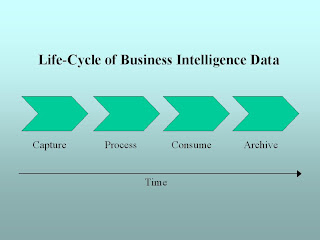
The middle two of the four components is where most business intelligence activity takes place, but all the components play a role in the cycle.
Next, we'll take a look at each of these components, beginning with Capture.

The middle two of the four components is where most business intelligence activity takes place, but all the components play a role in the cycle.
Next, we'll take a look at each of these components, beginning with Capture.
Subscribe to:
Posts (Atom)